Enhancing User Experience with a Dynamic Form Builder
Introduction
A dynamic form builder that supports complex registration flows can significantly enhance the user experience and reduce errors. This guide explains the benefits of using a dynamic form builder, including how it guides users through the registration process and ensures only necessary information is collected.
Benefits of a Dynamic Form Builder
1. Enhanced User Experience
Guided Registration Process
- Step-by-Step Guidance: A dynamic form builder provides a step-by-step registration process. Users are guided through each stage, ensuring they know exactly what information to provide and when.
- Reduced Complexity: By breaking down the registration process into manageable steps, users are less likely to feel overwhelmed. This improves their overall experience and increases the likelihood of successful form completion.
Conditional Logic
- Personalized Forms: Conditional logic allows the form to adapt based on user input. For example, if a user selects a specific option, additional fields relevant to that choice can appear. This personalization makes the form more relevant to the user.
- Streamlined Data Collection: Users only see and fill in fields that are necessary based on their previous answers. This reduces the amount of unnecessary information they need to provide, making the process quicker and more efficient.
2. Reduced Errors
Required Fields and Validation
- Mandatory Information: The form builder can enforce required fields, ensuring that users provide all necessary information before submitting the form. This reduces the risk of incomplete registrations.
- Real-Time Validation: Real-time validation checks user inputs as they fill out the form. Immediate feedback helps users correct errors on the spot, preventing submission of incorrect or invalid data.
Dynamic Hide and Show Logic
- Relevant Fields Only: Dynamic hide and show logic ensures that users are only presented with fields that are relevant to them. This reduces confusion and minimizes the chance of users inputting incorrect information in fields that do not apply to them.
- Clear Instructions: By showing or hiding fields based on user responses, the form provides clear instructions, guiding users to provide the exact details required.
3. Improved Data Quality and Management
Accurate Data Collection
- Targeted Questions: The form builder's ability to tailor questions based on user input ensures that the collected data is accurate and relevant. This leads to higher quality data, which is crucial for effective decision-making and event management.
- Minimized Redundancy: By only displaying necessary fields, the form builder minimizes redundancy, ensuring that users are not asked to provide the same information multiple times.
Efficient Data Handling
- Streamlined Processes: With accurate and complete data collection, administrative processes become more efficient. There is less need for follow-up communications to correct or gather missing information.
- Better User Segmentation: Conditional logic allows for better segmentation of users based on their responses. This enables more targeted communication and personalized follow-up actions.
Build your own form
You can find more details here on how the form builder works.
Appearance settings
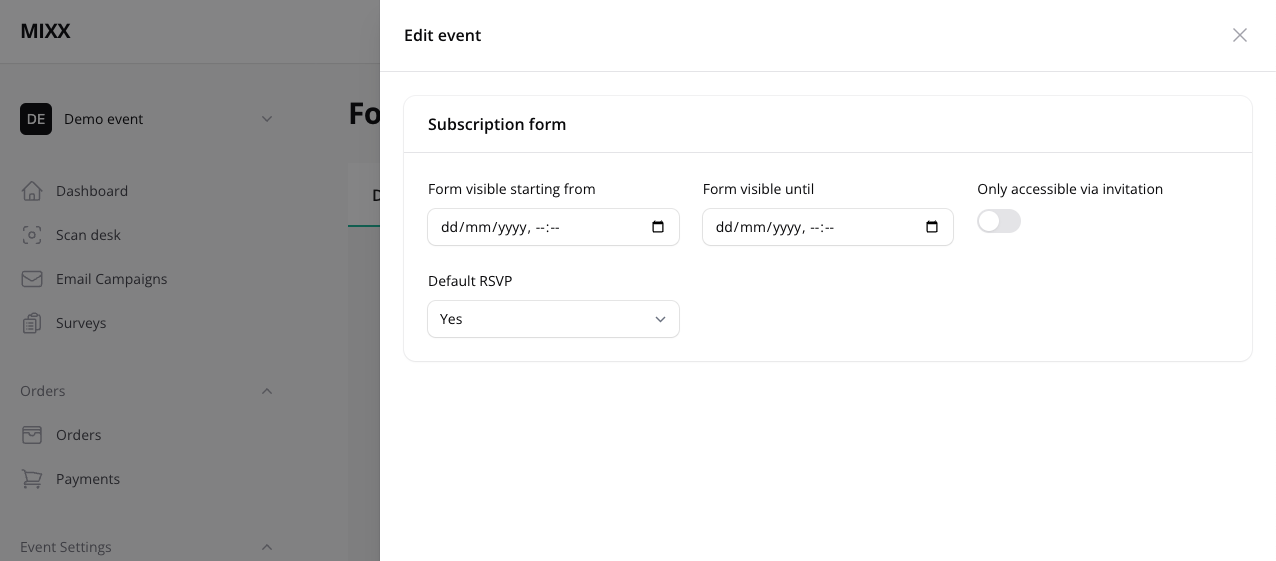
You can access these settings via the "Configuration" button.
Limit access to certain dates
The form can be scheduled to appear and hide during a specific period.
Only accessible via invitation
If you turn on this feature, the form will only be accessible via a unique invitation link, that can be sent via an email campaign.
Default RSVP
See our section about RSVP for a full explanation about this term.